

Power BI Courses
We offer a comprehensive suite of Power BI courses tailored to meet the needs of various skill levels, from beginners to advanced users. Our courses are designed to provide participants with the knowledge and skills necessary to harness the full potential of Power BI for data analysis, visualization, and business intelligence.
Our Power BI Courses are instructor-led, available online or in-person
Australia’s only Microsoft 365 Specialist Trainers. Dedicated to Power BI and other SharePoint courses

Partner
Power BI Essentials
- Duration: 2 days
- Target Audience: Beginners or those with minimal Power BI experience.
- Course Content:
- Introduction to Power BI
- Data loading and transformation basics
- Creating simple visualizations and reports
- Basic data modeling concepts
- Sharing and publishing reports
- Objective: To provide foundational knowledge and skills for creating and sharing basic reports and dashboards in Power BI.
Power BI Advanced
- Duration: 3 days
- Target Audience: Users with Power BI experience who want to deepen their skills.
- Course Content:
- Complex data modeling
- Advanced DAX (Data Analysis Expressions) functions
- Advanced visualization techniques
- Optimizing performance and best practices
- Integrating Power BI with other tools and services
- Objective: To equip participants with advanced skills for handling complex data scenarios, creating sophisticated reports, and optimizing Power BI solutions.
Power BI Report Design
Duration: 2 days
Target Audience: Users who want to improve their report design skills.
Course Content:
- Best practices in report design
- Creating visually appealing and effective reports
- Advanced visualization techniques
- Using themes and templates
- Enhancing user interaction with reports
Objective: To equip participants with the skills to design professional, user-friendly, and insightful Power BI reports that effectively communicate data stories.
Power BI DAX Essentials
- Duration: 2 days
- Target Audience: Users who need to understand and utilize DAX for data modeling.
- Course Content:
- Introduction to DAX (Data Analysis Expressions)
- Basic DAX syntax and functions
- Creating calculated columns and measures
- Implementing time intelligence functions
- Practical applications and use cases of DAX
- Objective: To provide participants with a solid foundation in DAX, enabling them to perform advanced data analysis and create powerful data models in Power BI.
Power BI Overview
In today’s data-driven world, businesses generate an overwhelming amount of data every day. This data, if harnessed correctly, can offer profound insights that drive strategic decisions, enhance operational efficiency, and fuel innovation. However, the challenge lies in making sense of this vast sea of information. This is where Power BI comes into play.
Why Power BI is Essential
- Data Consolidation and Integration: Power BI can connect to a wide range of data sources, including Excel, SQL Server, Azure, cloud services, and even web-based sources. This means you can bring all your data into one place, regardless of its origin, making it easier to analyze and draw comprehensive insights.
- User-Friendly Interface: Designed with the end-user in mind, Power BI’s intuitive drag-and-drop interface allows even non-technical users to create compelling data visualizations. This democratizes data analysis, enabling everyone in the organization to participate in the decision-making process.
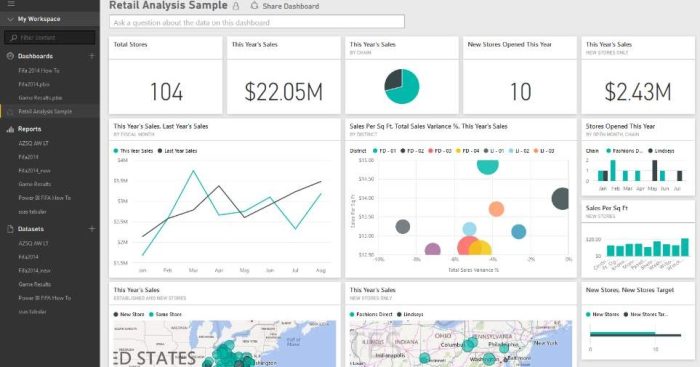
- Advanced Data Visualization: Power BI offers a wide array of visualization options, from simple charts and graphs to complex maps and gauges. These visualizations can be customized and combined in interactive dashboards, making it easier to spot trends, identify anomalies, and derive insights at a glance.
- Real-Time Data Access: In today’s fast-paced business environment, timely data is crucial. Power BI supports real-time data streaming, which means you can monitor your business operations as they happen, enabling quicker responses to emerging opportunities and threats.
- Enhanced Collaboration and Sharing: Power BI’s sharing capabilities are robust, allowing teams to collaborate seamlessly. Reports and dashboards can be shared with colleagues within the organization or externally, and users can access these reports from any device, be it desktop or mobile.
- Advanced Analytics: For users with more advanced analytical needs, Power BI integrates with tools like Excel and Azure Machine Learning. Additionally, its support for DAX (Data Analysis Expressions) allows for complex calculations and data modeling, enabling deeper insights.
- Scalability and Flexibility: Whether you are a small business or a large enterprise, Power BI scales to meet your needs. Its flexible architecture supports both on-premises and cloud-based deployment, ensuring it fits seamlessly into your existing IT infrastructure.
- Cost-Effective: Compared to other business intelligence tools, Power BI is cost-effective, offering a robust set of features at a fraction of the cost. This makes advanced analytics accessible to businesses of all sizes.
Why Learn Power BI in 2025?
Power BI continues to lead the way in business intelligence tools for organizations using Microsoft 365. In 2025, data-driven decision making is a must-have skill, and Power BI empowers professionals to visualize, analyze, and share insights across platforms.
Whether you’re a business analyst, IT professional, or team leader, learning Power BI helps you:
-
Turn raw data into actionable insights
-
Create interactive dashboards and reports
-
Connect with over 100 data sources
-
Present data clearly to drive decisions
With Power BI now integrated seamlessly with Microsoft Teams, SharePoint, and Excel, there’s never been a better time to invest in your data skills.
Meet Your Trainers
All our courses are delivered by Microsoft Certified Trainers (MCTs) and Microsoft Most Valuable Professionals (MVPs) who bring real-world business intelligence experience to the virtual classroom.
Our Power BI instructors are:
-
Experienced in enterprise-level BI implementations
-
Certified in Microsoft 365, Azure, and Power Platform
-
Passionate educators who provide hands-on support
-
Globally recognized experts in data analysis and visualization
At 3grow, we pride ourselves on not just teaching Power BI—but helping you apply it.
Frequently Asked Questions
Do I need experience with Excel or data tools?
No prior experience is required for our Power BI Essentials course. However, familiarity with Excel is helpful.
Are the courses delivered live?
Yes. All Power BI training is instructor-led, live, and highly interactive—whether online or in-person.
Can I get certified?
While our courses are not formal certification programs, they prepare you well for the PL-300: Microsoft Power BI Data Analyst exam.
Is group or private training available?
Yes, we offer tailored corporate Power BI training for teams across Asia-Pacific.
What tools do I need?
Just a Windows laptop with Power BI Desktop installed (free from Microsoft). We’ll guide you through setup during the course.
Power BI Course Options
At 3grow, we offer Power BI training courses for all skill levels—from beginners to advanced users. Each course is live, instructor-led, and tailored to real-world business needs.
Power BI Essentials
Perfect for those new to the platform. Learn how to connect to data sources, create visualizations, and publish dashboards.
Key skills covered:
-
Power BI Desktop fundamentals
-
Building and formatting visuals
-
Data modelling basics
-
Publishing to the Power BI service
Power BI Advanced
Designed for experienced users who want to enhance their skills in complex data modelling and advanced reporting techniques.
Key skills covered:
-
DAX (Data Analysis Expressions)
-
Advanced visualisation techniques
-
Row-level security
-
Optimising data models for performance
Power BI DAX Essentials
A focused course on mastering DAX formulas to perform dynamic calculations and unlock deeper analysis.
Key skills covered:
-
Calculated columns and measures
-
Time intelligence functions
-
Context and filter behaviour
-
Practical DAX for business users
Advanced Power BI Features
In today’s data-centric roles, mastering advanced Power BI features is a competitive advantage.
Our courses help you unlock:
-
Power Query for data transformation
-
DAX expressions for deep analytics
-
Custom visuals for unique reports
-
Power BI Service for secure sharing and scheduling
-
Power BI + Microsoft 365 integration (e.g., Excel, Teams, SharePoint)
Whether you’re building executive dashboards or automating report distribution, our training gives you the skills to do it confidently.
See where the next Power BI Essentials course is ...
Request more info …
FAQs
What is Power Query?
Power Query is a data connection technology that enables you to discover, connect, combine, and refine data across a wide variety of sources.
What is DAX?
DAX (Data Analysis Expressions) is a formula language used in Power BI for creating custom calculations in your data models.
What types of visualizations can I create in Power BI?
You can create various visualizations including bar charts, line charts, pie charts, maps, and more. The course covers how to customize these visuals to best represent your data.
Can I share my reports and dashboards with others?
Yes, Power BI allows you to publish and share your reports and dashboards with colleagues and stakeholders through Power BI Service.
What is data modeling in Power BI?
Data modeling involves creating relationships between different data tables and using DAX to create calculated columns and measures. This helps in organizing and structuring your data for better analysis.
Looking for more courses?
3grow offers a wide range of Microsoft 365 courses available online of in-person.